UI Cheats Extension: cheats with a right-click
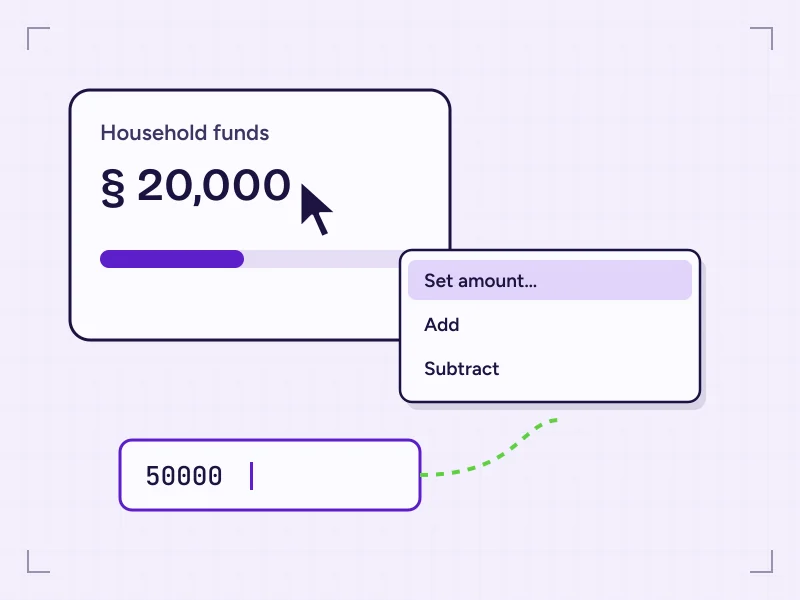
A free script mod by weerbesu that turns The Sims 4 interface into a cheat panel. Right-click needs, household funds, skills, careers or relationships and set the value you want, without typing a single console command.
- Creator
- weerbesu
- Price
- Free
- Files
- 2 parts
- Needs
- Script mods on
§01 What it is
What is UI Cheats Extension?
UI Cheats Extension is a script mod for The Sims 4 that moves the game's built-in cheats into its own interface. Normally, changing a Sim's skill or a household's money means opening the cheat console and typing a command with exact spelling, often using an internal name. With this mod installed, you right-click the panel you can already see and type the number you want.
It doesn't add objects, careers or new gameplay systems. It works on top of what's already on screen: needs, moodlets, skills, careers, relationships, aspirations, traits and, depending on your packs, things like seasons, collections and perk points. That's why players use it for story setups, fixing bugged Sims and skipping grinds they've already done.
Because it hooks into the interface, it's built for specific game patches. Keeping it matched to your game version is the single most important thing to know about it.
§02 Features
One click, many panels
Nearly every feature follows the same pattern, so once you've used one you know them all. Options tied to an expansion, game or stuff pack only appear if you own that pack.
-
F1Needs and moodlets
Set any need bar to the level you want, or remove a moodlet that's stuck or doesn't fit the scene.
-
F2Skills
Choose a skill level directly, add a skill the Sim hasn't started and manage mastery perks.
-
F3Careers
Move a Sim up or down their career ladder and complete active-career tasks.
-
F4Relationships
Set friendship and romance anywhere from -100 to 100 to build friends, partners or rivals.
-
F5Traits and Formative Moments
Add or remove traits; recent builds also include Formative Moments in the Add Trait menu.
-
W1Household funds
Set an exact balance instead of repeating money cheats.
-
W2Aspirations and events
Complete goals for aspirations, parties, dates and holiday traditions.
-
W3World settings
Change season, weather or lunar phase with the matching packs.
-
W4Collections and plans
Spawn missing collectibles or repeal a Neighbourhood Action Plan.
§03 How it works
From download to first right-click
Four short checkpoints. The detailed procedure with folder paths is in the installation section below.
-
Check prerequisites
Play on PC or Mac and update The Sims 4 so it matches the mod build you're installing.
-
Download the archive
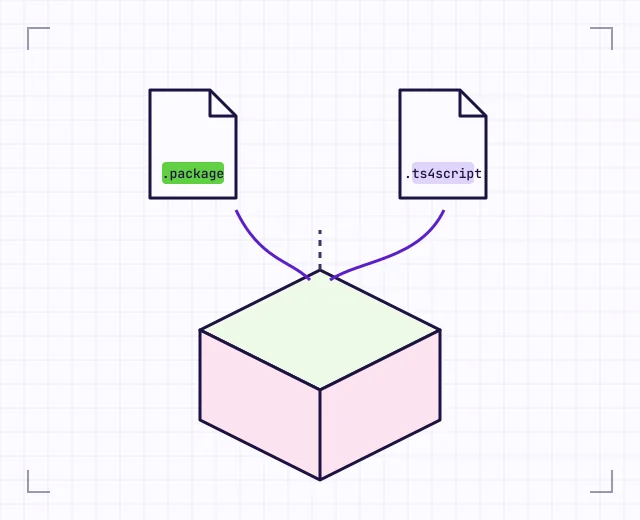
Get the zip and extract the .package and .ts4script files from it.
-
Place both files
Move them into the Mods folder, directly or one subfolder deep, and remove any older copies.
-
Enable and launch
Allow custom content and script mods in Game Options, restart, then right-click a panel.
§04 Installation
Installation and setup, step by step
The install takes a few minutes. Most problems come from a script file placed too deep, or from forgetting the script mods option.
-
Extract the download
Save the zip archive to your desktop and extract it. You should see one
.packagefile and one.ts4scriptfile. -
Open your Mods folder
Windows:
Documents\Electronic Arts\The Sims 4\ModsMac:
Documents/Electronic Arts/The Sims 4/Mods -
Remove old copies
Delete every older UI Cheats Extension file before adding the new release. Two versions side by side cause errors.
-
Place both files together
Put them in
Modsor one subfolder such asMods/UI Cheats Extension/. The game won't read a script file any deeper than that. -
Enable mods in the game
Go to Game Options > Other and tick Enable Custom Content and Mods and Script Mods Allowed.
-
Restart and test
Restart the game, load a household and right-click the household funds. A menu or input box means the mod is working.
§05 Compatibility
Compatibility reference
UI Cheats Extension depends on your platform, your game patch and the packs you own. Here's what's known, with no guesses about specific patch numbers.
| Item | Status | Notes |
|---|---|---|
| Windows PC | Works | EA app or Steam versions; the Mods folder is in Documents. |
| Mac | Works | The same two files as on Windows. |
| PlayStation / Xbox | Not possible | Console editions don't load mods. |
| Game patch | Must match | Each build is made for a specific patch. Update both together. |
| Script mods setting | Required | Game Options > Other > Script Mods Allowed, then restart. |
| Expansion, game and stuff packs | Varies | Pack-specific options appear only when the pack is installed. |
| Other mods | Varies | Mods that change the same interface panels can conflict. |
| CurseForge | Not listed by creator | Install and update manually; see the CurseForge article. |
§06 Troubleshooting
When UI Cheats Extension seems broken
Most problems come down to a version mismatch or a file in the wrong place. Start at the top.
Full troubleshooting steps-
Nothing happens on right-click after a patch
Your mod build doesn't match the new game version. Install the build made for your patch, and remove the mod until one is available.
-
Menu opens, but values don't change
The script file isn't loading. Keep the .ts4script no more than one folder deep and make sure Script Mods Allowed is ticked.
-
Mods stopped loading after an update
The game can switch mods off after a patch. Re-tick both options under Game Options > Other and restart.
-
Errors or odd behaviour in Create a Sim
An outdated interface mod often causes this. Update the mod, delete localthumbcache.package and test again.
-
lastUIException.txt keeps appearing
Check for duplicate copies and other UI mods. Test UI Cheats Extension on its own, then add mods back in halves.
§07 Release information
Release and version notes
The archive linked from this page is named UI_Cheats_Extension_v1.59.1.zip. We take the
version from the file name only. Check it against the creator's latest release post and your game patch
before installing.
If you're looking for older builds such as v1.50 or v1.52, remember that they were made for earlier patches. They're unlikely to work on an updated game. The version notes explain how to pick the right build.
§08 Download
Download UI Cheats Extension
UI Cheats Extension is a free script mod for The Sims 4 on PC and Mac. The download is a zip archive.
Releases of the mod contain a .package file and a .ts4script file, which you
place in your Mods folder.
- Game: The Sims 4
- Platforms: Windows, Mac
- File: UI_Cheats_Extension_v1.59.1.zip
- Requires: script mods enabled
§10 Use cases
How players use it
Cheating is a play style, not a shortcut you have to justify. These are the most common reasons players install UI Cheats Extension.
-
Setting up a story
Start a household with the relationships, skills and careers your story needs, instead of building them through hours of play.
-
Fixing bugged Sims
Clear a stuck moodlet, complete a goal that won't register or correct a relationship that changed for no reason.
-
Skipping a familiar grind
Jump past skill levels or career stages you've already earned in previous saves.
-
Building and testing
Set household funds directly while you build, then put them back to a realistic amount when you play.
-
Legacy challenge clean-up
Repair milestones and formative moments lost to bugs without breaking your own rules.
-
Preparing shared saves
Fine-tune Sims and households before sharing a save file or a household with others.
§12 Pros and cons
Pros and cons
Pros
- Replaces most typed cheat commands with a right-click.
- Covers a wide range of panels, from needs to world settings.
- Free, with regular updates from the creator.
- Works the same on Windows and Mac.
- No new objects or systems cluttering your game.
Cons
- Needs updating after most major game patches.
- An outdated build can break interface panels or Create a Sim.
- Manual installation; no app keeps it up to date for you.
- Can conflict with other mods that change the same interface.
- Not available on console editions.
§13 FAQ
Frequently asked questions
Twenty answers, in two groups. Use the arrow keys to move between questions.
Installing & compatibility 10 entries
Yes. The creator, weerbesu, shares the mod for free through public Patreon posts. You don't need a paid subscription to download it.
Two files from the same release: a .package file and a .ts4script file. Both go in your Mods folder, either directly or inside one subfolder.
On Windows it is usually Documents\Electronic Arts\The Sims 4\Mods, and on Mac it is Documents/Electronic Arts/The Sims 4/Mods. If OneDrive syncs your Documents folder on Windows, check under OneDrive\Documents too.
Open Game Options, go to the Other tab and tick both Enable Custom Content and Mods and Script Mods Allowed. Then restart the game, because script mods only load at startup.
Yes, but only one level deep. The game ignores .ts4script files that are two or more folders below Mods, which makes the mod look broken.
Yes. Mac players use the same two files as Windows players. Only the folder path looks different.
No. The console editions of The Sims 4 don't load mods, so no version of UI Cheats Extension can run on them.
The creator publishes it through Patreon rather than CurseForge, and community sites note it hasn't been hosted there. You install and update it by hand, even if other mods in your game are managed by an app.
Use the build the creator lists for your current game patch. Each release is made for a specific patch, so older builds such as v1.50 or v1.52 are unlikely to work on an updated game.
No. UI Cheats Extension works on its own. It can be used alongside other mods, but mods that change the same interface panels can conflict with it.
Using the cheats & fixing problems 10 entries
Right-click the part of the interface you want to change, such as household funds, a need, a skill bar or a relationship. Then pick an option or type a value. You don't need to enable testing cheats.
Yes. Right-click a Sim in the Relationships panel to set friendship or romance anywhere from -100 to 100.
Yes. You can add or remove traits, and recent builds (from v1.54) also list Formative Moments in the Add Trait menu.
If you own the pack that adds them, you can right-click the season, weather or lunar phase icons to change them.
The mod edits interface files that patches often change, so a build made for an older patch can stop lining up. Update to the build made for your new patch, and re-check that script mods are still enabled.
That usually means the .package file is loading but the .ts4script file isn't. Check that the script file is no more than one folder deep, that Script Mods Allowed is ticked, and that you restarted the game.
It's an error log the game writes to your Sims 4 documents folder when the interface hits an error. If it appears right after you use the mod, the build is probably out of date or clashing with another UI mod.
It's safe to delete, and the game rebuilds it on the next launch. Clearing it after updating mods can remove stale interface data.
The changes you make are real game state, so save before large edits. Taking the mod out later doesn't undo values you've already set, such as money or skill levels.
Delete both old files, add the .package and .ts4script from the new release, delete localthumbcache.package, check that script mods are still enabled and restart the game.